5/20/2019

3 ways to make vas6154 or TC XS work as pt3g

There is only 3 ways that the vas6154 or TC XS will work as pt3g
1. you flash the GL123…… from VAS to pt3 (you will get also the Serial from the Donar)
2. You use some home made firmware (serial from VAS will stay there also you can see on the webserver that the emergency firmware is still VAS or TC XS)
3 you use the same way like the VCX do it. after the Piwis system will think it is a PT3G.
the VCX do the same


You buy a original or any decent china clone PT3G remove there the GL128, read the data out buy some new GL128 progamme it with the data and solder the ic back to the vas interface and you are done.
porsche-piwis-tester-iii-1

porsche-piwis-tester-iii-2

porsche-piwis-tester-iii-3
But you have to know the risked, we damage the pt3g and have to repair the board, we have to manufacture a plastice to fix the bold GL128 back on place right place you have only 1 chance.
for me as a solution to much work.
I paid some people to make some firmware but until now no 100% working firmware.
The last solution is the easy.
You just buy a xvc after the xvci is working on your system you change all know xvci data to vas 6154. and you are done.
You have to do it after every update.
last version is
you just pay some porsche sparepartmanager some money and order there your pt3g.
but than you will not get the interface for 1400€


Thanks to kiranabc for his contribution

4/23/2019

How to update shell config. for Porsche Piwis3?

Porsche Piwis III Developer Mode:

The Developer Mode in Porsche Piwis 3 is not available when you update the shell, coz you lose the menu diagnostics configuration to switch between regular and developer mode,
Problem solved if you copy the old file com.porsche.piwis.Shell.exe.config


Here is how to update the shell config. and get the diagnostic configuration boxes back, on the system tab.

After a successful update from 37.250.20 you will loose the two above mentioned boxes from the System tab.
If you did not loose them, then the [PIDT] diagnostic software did not update completely.
So it’s a good thing to loose it !
Go to C:\PiwisApps\Shel\ and carefuly edit with notepad   this file –> com.porsche.piwis.Shell.exe.config
after the update the PIDT section shows up in green, after U edit it it will be blue.
First picture shows, red underlined, 2 places, beginning and the end of the green section, what to remove.
On top [Line 568 on mine] U delete  these four symbols       !–<     on the bottom [line 603 on mine] U delete these 3 symbols   –>
Then U save the config file.
Restart the PC and your Diagnostic config box for 991,981,970 and Diagnostic config for other models RE-APPEAR.
rm996 has the solution how get the developer functionality back up and running, !!!
[Similar solution for the lost with the Update Wiring Diagrams ]
vxdiag-piwis3-developer-mode-1

vxdiag-piwis3-developer-mode-2
Another tip might help you also.

It’s how to enable Developer Mode for Piwis 3

Developer mode is a special Piwis program that allow a lot of advanced coding normally reserved only to Factory.
With this function you will have a tool that can do more than software of official Porsche Dealer.
For example, you can reprogram all ECUs completely offline.


How to use Piwis Developer Mode:

Install winrar and winhex on your computer.
-1-locate the file c:\program files\porsche\PIDT_P_MIG_DLSS3\pidt\plugins\de.dsa.pidt.datatype.jar and copy it on your desktop in order to modify it.
Open it with winrar,in the wirar windows locate the file
\de\dsa\pidt\datatypes\utils\Helper$1.class and drag it on your destop , delete it from the archive after the copy, keep the winrar window open.
Open Helper$1.class on your desktop with winhex and goto offset E81, replace 9A by A7 and save.
Drag back the save file on the winrar windows still open and click OK.Close winrar
Copy the new file de.dsa.pidt.datatype.jar you just made in
c:\program files\porsche\PIDT_P_MIG_DLSS3\pidt\plugins, overwrite it.
copy the file aftersales.sig on your desktop and rename it development.sig.Copy this file back in the folder
Do exactly the same method given above with the folder c:\program files\porsche\PIDT_P_MIG_DLSS3 with its own files.
To transform it in developer :
Settings
Diagnostic configuration
981-991, mode, operating mode, E= development, P= production, V= aftersales ( regular piwis)
Other models line, mode, operating mode, E= development, P= production, V= aftersales ( regular piwis)
This method to switch between regular and developer works only with my backup and will not work anymore after
an update.

Images:
vxdiag-piwis3-developer-mode-3

vxdiag-piwis3-developer-mode-4

vxdiag-piwis3-developer-mode-5
  
Maybe this helps Folks some.


4/07/2019

Porsche PIWIS cable Durametric 3.0.15.0 Review

Here are reviews from those have tried the Chinese knock off Durametric tool on the web: http://www.obdii365.com/wholesale/porsche-piwis-cable-free-shipping-617.html


cheap & works:
I have a cheap Chinese copy and it works. but it only allows me to use an early version of the Durametric software which is why it comes with the software on CD Rom. i cannot for example download version 6 from the Durametric website and use it with the copy cable.

works with durametric 3.0.15.0:
i bought few months ago a PIWI cable on the web. I tried it with durametric 3.0.15.0 and it works fine but with restrictions.
I did a test with release 5 and 6 and it failed

only with Durametric version 3:
You can update some of the Durametric clone cables, but most of them are bricked if you go beyond around version 5.0.6 of the Durametric software. Others are bricked way before that. So as Clint would say “Do you feel lucky?” They usually come with V3.1 software, which is hopelessly out of date, and very limited on what you can do on a 9×7 onwards. OK-ish for 9x6s though.
If you want something that will read and reset fault codes, and read live data, from all the control modules of everything from a 9×6 up to a 9×1, including Panameras and Cayennes, take a look at the iCarsoft i960 hand held scanner. About £100. It won’t reset service indicators, but is a useful tool for diagnostics, and resetting things like airbag lights. (No affiliation, by the way).

need Windows XP:
Used this. direct off obdii365.com not resold and marked up.
Search for Porsche PIWIS.
Yes if your car is listed it will generally work, but you need Win XP ideally though bodging some drivers for a later version of Durametric gets it to work on Win 8. Looking into this for you, I downloaded Durametric 5 or 6 and used the drivers. Or just source a cheap Win XP laptop.
“YMMV” but if you just want to fool around no harm in trying. I got some interesting info off this, and also reset an airbag light (oddly, via 993 model selection despite being a 996).
My conclusion, if you are half hearted about this and don’t really see the need to splash out on a Durametric kit, then yes, this is worth having, and useful.

useful to read error code:
this is not a bad product.
you can reset most if not all the warning lights.
also useful to read error code from CEL
I think if you are gonna work on the car, you need it.
I wish they would have emulated the FULL PIWIS functions but this is just a small part of what the dealer can do.

read & clear fault codes:
With the software I could only read fault codes for each of these item and then clear them. I went through each of them to see what other contents were shown and they all save for the airbag 04 showed “no fault” and the Climate Control had a whole page of errors of something like “left flapper valve value implausible”. The air con works fine so I left this alone.
I only bought this Durametric cable for the air bag light and it served my purpose. I would not know what to do with other fault codes if I had them.
Worked for me.

useful, reset the airbag light:
I bought one for 20 usd, found it useful and actually reset the airbag light with it.
You can also delete error codes, read a lot of live and stored performance data off it, etc etc.
It’s a previous version of Durametric.
It works as long as you know the limitations, major one being XP only unless you install the Durametric V6 drivers then you can get it to work on Win8 and presumably previous versions of Windows too.
I’m not sure re using Durametric V6 in its entirety though, I thought you needed a specific proprietary cable for that which is why the clones are always supplied with an older version of Durametric.
Useful tool if you are not willing (or needing) to commit to anything special.

worth, able to reset the airbag light:
For what it’s worth, this knock-off was able to reset my airbag light for a total outlay of $43. My 993 came back from some simple repairs with the light illuminated. Of course the garage know nothing about it and when asked said “common to the 993, we didn’t do it”.
The software installed says “durametric for porsche version 3.0.15.0” which was downloaded from their site. Sadly I did not take a screenshot or copy the fault codes which appeared for the air bag unit before I cleared them. I suspect that the functionality is limited due to the age of the software, when plugged in I only saw the following items to review / clear, and my exact recollection of the numbers following the modules is not clear:
DME 5.0
DME 5.5
Air bag 02
Airbag 04
Climate Control
[perhaps one other I cannot recall]

work ok:
I bought something similar for E20 and it seems to work OK although I think after trying the Cd it came with I ended up downloading software from Durametic site.
I think this is it:

work fine:
yes i can confirm it works fine. Ordered from them last week. Ive been able to reset my airbag, sort service light etc and saved me an expensive trip to my local Porsche dealer.


Conclusion:
The Durametric clone cable (also called Porsche PIWIS cable) is verified to works perfectly for fault codes read & clear and airbag light reset. But the cable cannot works for new software; you have to install Durametric 3.0.15.0 on Windows XP only! That is, you cannot update Durametric sw to version 5 or version 6 for new vehicles. Durametric version 3 works with most Porsche in the year 1990 – 2007:
1996-1998 Porsche 911 (993)
1996-1998 Porsche 911 Turbo (993)
1998-2004 Porsche 911 Carrera (996)
1998-2004 Porsche 911 Carrera 4 (996)
2000-2005 Porsche 911 Turbo (996)
2000-2005 Porsche 911 GT2, GT3 (996)
2005-2007 Porsche 911 (997)
1997-2004 Porsche Boxster (986)
2000-2004 Porsche Boxster S (986)
2005-2007 Porsche Boxster (987)
2003-2006 Porsche Cayenne (955)
2005-2007 Porsche Cayman (987)

4/02/2019

How to use Durametric version 3 with Porsche PIWIS cable

Instruction: How to use Porsche PIWIS diagnostic cable with Durametric version 3 to read and clear fault codes

The software:

durametric version 3.0.15.0 
piwis-cable-version-3-pic-1

The cable:
This is the only Chinese clone cable confirmed to work with durametric 3.0.15.0
Reset service reminders: confirmed!
Reads diagnostic trouble codes: confirmed!
Displays actual values: confirmed!
Shows ECU information: confirmed!
Clears diagnostic trouble codes: confirmed!
Turns off check engine light: confirmed!
Turns off airbag light: confirmed!

Porsche Diagnostic Connector Locations
The location of diagnostic connectors on most cars is under the dash on the driver’s side. Here are some
common connector locations:
  • 944/968 – Under the dash on the passenger’s side
  • 928 – Under the side cover of center console next to passenger’s seat
  • 964 – On the passenger’s side kick panel behind a round cover
  • 993
o 1994 – 1995 – For models with the 19-pin round connector, it is located on the
passenger’s side kick panel behind a round, plastic cover
o 1995 – 1998 – For models with the 16-pin OBDII connector, it is located on the driver’s
side of the center console behind a round, plastic cover
  • 986 / 996 – Under the dash on the driver’s side
  • 987 / 997 – Under the dash on the driver’s side
  • 981 / 991 – Under the dash on the driver’s side
  • Cayenne – Under the dash on the driver’s side
  • Panamera – Under the dash on the driver’s side

Connect the piwis cable
WARNING: Do NOT use a power inverter to power your computer when using Durametric.

Depending upon the kit you ordered, you will have one, two, three, or four cables. Before starting the
Durametric program, connect the tool to your car as follows:
  1. Switch the car’s ignition to its accessory position.
  2. If the car is a 2005 model or newer, turn on the hazard lights (emergency flashers). This will help keep the car’s CAN bus awake during diagnostics.
  1. Connect your Durametric cable(s) to the car.
  • If you are using only the Durametric USB-to-OBDII cable, connect this cable to the OBDII diagnostic port in your car.
  • If you are working on a pre-1996 model year car, connect the round adapter cable to the round diagnostic port in the car and connect the Durametric USB-to-OBDII cable to the round adapter cable.
  • If you purchased the 50’ extension cable, connect it directly to the car (or to the round adapter cable) and connect the USB-to-OBDII cable to the extension cable.
  • If you are working on a Porsche factory racecar and have the Durametric cup adapter cable, connect it between the USB-to-OBDII cable and car or between the 50’ extension cable and the car.
  1. Connect the Durametric cable to the USB port on your computer.
  2. Confirm a steady green LED at the OBD-end of the Durametric cable, that your computer recognizes the attached Durametric cable, and – with the first connection – the computer indicates the hardware is installed successfully.

Using Durametric
Durametric is equipped with many of the same capabilities and features of the Porsche factory tools.
The following sections guide you through the many features of the program to help you get the most
from your tool.

Start Durametric
Connect the cables before starting the program. To start the program after its initial installation double click the Durametric 6 desktop icon, or:
  1. Click the Windows Start button.
  2. Select All Programs
Upon starting the program, you will see the Durametric logo screen(s) of the main program.

Choose a vehicle
The first screen to appear after successful installation of the software is the Choose Vehicle dialog. Here
you can choose a car based on make, model, series, and year. Alternatively, you can choose a specific
control unit from the list of all supported control units found under the Individual Control Modules tab
of the Choose Vehicle dialog
piwis-cable-version-3-pic-2


Fault Codes/Shadow Fault Codes
Fault codes, shadow fault codes, their descriptions, and fault status information are included in the
display when supported by the control unit. The codes displayed are the same codes used by the factory
tool and can be directly referenced in the factory service manual or other reputable repair manuals.
Freeze frame details are included with supported engine control units. Freeze frame information
includes various operating and environmental data taken at the time the fault appeared. You can use
this information to aid in troubleshooting and to help resolve improper operation.
Control units store some faults for information-only purposes. In these cases, there is no repair action
necessary. Durametric indicates the difference between actionable faults and information-only faults
using two icons. The yellow circle icon with the exclamation point in the center indicates an information- only fault. The red circle icon with the exclamation in the center indicates an actionable fault. Refer to your car’s service repair manual for more information on information-only faults.
piwis-cable-version-3-pic-3

Erase Fault Codes/Erase Shadow Fault Codes
To clear fault codes or shadow fault codes from the control unit’s memory, click on the Erase Fault
Codes or Erase Shadow Fault Codes option, respectively, for the control unit selected.
Alternatively, you can select to erase fault codes in all control units at once by selecting the Functions
menu option and selecting Clear faults in all units.
It is not possible to erase only one fault code. If faults remain after attempting to clear them, it indicates
the problem(s) causing the condition still exists. For example, if the fault you see is “Electrical fault,
oxygen sensor ahead of catalytic converter bank 2,” and you have not repaired the problem, you will not
be able to clear the fault


Review 1:
I bought one for 20 usd, found it useful and actually reset the airbag light with it.
You can also delete error codes, read a lot of live and stored performance data off it, etc etc.
It’s a previous version of Durametric.
It works as long as you know the limitations, major one being XP only unless you install the Durametric V6 drivers then you can get it to work on Win8 and presumably previous versions of Windows too.
I’m not sure re using Durametric V6 in its entirety though, I thought you needed a specific proprietary cable for that which is why the clones are always supplied with an older version of Durametric.
Useful tool if you are not willing (or needing) to commit to anything special.

Review 2:
I have a cheap Chinese copy and it works. but it only allows me to use an early version of the Durametric software which is why it comes with the software on CD Rom. i cannot for example download version 6 from the Durametric website and use it with the copy cable.

Review 3:
You can update some of the Durametric clone cables, but most of them are bricked if you go beyond around version 5.0.6 of the Durametric software. Others are bricked way before that. So as Clint would say “Do you feel lucky?” They usually come with V3.1 software, which is hopelessly out of date, and very limited on what you can do on a 9×7 onwards. OK-ish for 9x6s though.
If you want something that will read and reset fault codes, and read live data, from all the control modules of everything from a 9×6 up to a 9×1, including Panameras and Cayennes, take a look at the iCarsoft i960 hand held scanner. About £100. It won’t reset service indicators, but is a useful tool for diagnostics, and resetting things like airbag lights. (No affiliation, by the way).

Review 4:
I bought something similar for E20 and it seems to work OK although I think after trying the Cd it came with I ended up downloading software from Durametic site.
I think this is it:


Review 5:
yes i can confirm it works fine. Ordered from them last week. Ive been able to reset my airbag, sort service light etc and saved me an expensive trip to my local Porsche dealer.

Review 6:
Used this. direct off obdii365.com not resold and marked up.
Search for Porsche PIWIS.
Yes if your car is listed it will generally work, but you need Win XP ideally though bodging some drivers for a later version of Durametric gets it to work on Win 8. Looking into this for you, I downloaded Durametric 5 or 6 and used the drivers. Or just source a cheap Win XP laptop.
“YMMV” but if you just want to fool around no harm in trying. I got some interesting info off this, and also reset an airbag light (oddly, via 993 model selection despite being a 996).
My conclusion, if you are half hearted about this and don’t really see the need to splash out on a Durametric kit, then yes, this is worth having, and useful.
http://blog.obdii365.com/2019/04/03/use-porsche-durametric-v3-cable-to-read-clear-codes/

Free Download VXDIAG Porsche PIWIS III 38.250.000

Free download VXDIAG Porsche PIWIS 3 software latest version 38.250.000:
porsche-piwis-3-v38-download-1

Date: 02-04-2018
Version: 38.250.000
Password: No
Activation: unknown
Expiration: unknown

Image: piwis 38.250.000
porsche-piwis-3-v38-download-2

porsche-piwis-3-v38-download-3

porsche-piwis-3-v38-download-4

porsche-piwis-3-v38-download-5

porsche-piwis-3-v38-download-6
Security: unknown! it’s your own risk!
To use with relief,
You’d better use a tested version Piwis 37.900 for Porsche diagnostics and programming
Piwis v37 has a good success with VXDIAG Porsche diagnostic tool

Good at maintenance, repair, control units change and programming & setting codes
New Piws 3 operation system and more intuitive diagnostic interface as Piwis III
VCX-DoIP Piws 3 Interface For Porsche post-2017 vehicles with DoIP diagnosis
VCX-DoIP J2534 Piws 3 VCI look for maintenance wiring diagram
VCX-DoIP Piws 3 login for online immobilizer programming
VCX-DoIP j2534 Piws 3 PST3 Interface support special functions like modification or flashing, with Engineering mode (Development version)
Developer mode enabled
Worked with new and old Porsche vehicles!
New & Old Cars:
All Porsche from 1998-2018:
Porsche 911(997) (991)
Boxster/Cayman (987)
Cayenne up to MY 2010
Cayenne from MY 2011
Panamera
Especially the latest models:
Paramera (971) 2018
Caynenne (92A) 2018
Macan (95B) 2018
911 (991) 2018
and other old models
VXDIAG Piwis 3 images:
vxdiag-piwis3-image-1

vxdiag-piwis3-image-2

vxdiag-piwis3-image-3

vxdiag-piwis3-image-4

vxdiag-piwis3-image-5


3/18/2019

Possible to use Porsche PIWIS 3 on VAS6154 head?

Look here: How to use VAS6154 head with Porsche PIWIS 3

project PIWIS3 PT3G => VAS6154-Kolun a
look at below link when you take your right to use
1 have to have installed piwis 3 laptop.
2. install piwis 3 driver
3 put together vas6154 install the drivers for vas6154-piwis // attempt to update interface Flesch
, if you see 6154 as pt3g then it is ok if nevidi next step =>
4 separated you from laptop
5. Copy the deteskop and install VAS 6154 driver 3.0.2.807 // installation after installation tend to deteskopa the trash
6 interface connects you 6154
7 program you run driver
8 interface you see 6154
9 select USB. Save.
10 restart.
11 tart driver program tach app (the first option above left) choose passthru> pt3g-3 piwis install seeks interface.
12 restart
13 Interface joints run driver VAS6154 seen as a passthru pt3g update memory device, check the USB version pt3g dal see you ok almost 6154
Note: please be careful and do it on your own risk.
obdii365.com will not give support
Contributor: ibi1961

Update: Unless you find the 08 firmware
The picture below is VAS 6154
vas6154-porsche-piwis3-1

vas6154-porsche-piwis3-2

vas6154-porsche-piwis3-3

VERY IMPORTANT:
For sake of security, you’re advised to use odis with vas6154 and use piwis with porsche tester 3
with relief!
Piwis III V37.250.020 – confirmed to work no issues with Vxdiag Porsche
Diagnostic test: passed
Coding: passed
Programming: passed
attached vas6154 driver download, installation instruction, wlan setup….

3/13/2019

Should I use Porsche PET 2 V8.0 instead of PET 7.3?

Free download PET 2 – Porsche Elektronischer Teilekatalog / Porsche Electronic Parts Catalogue:
[DOWNLOAD]
[PREMIUM]
[PASSWORD]
XTR3M3
porsche-pet-v8-1
Version:
This is a full version of the Original Porsche Electronic Parts Catalogue

Language:The setup is in German, but after the installation the parts catalogue can easily be changed to English and other languages.
Operating system:
Windows 7/8/10 32Bit/64Bit System
you can install native or virtual [VM]

PET 2 Installation Instructions:
1. Download all .rar Files, extract it and start PET2_2019-XTR.exe
Password for archive/download (not for Installation): XTR3M3
The Installation Wizard will guide you through the installation.
2. Password for Installation (not for archive): XTR3M3@PET_2-Q1/2019

What is PET2:
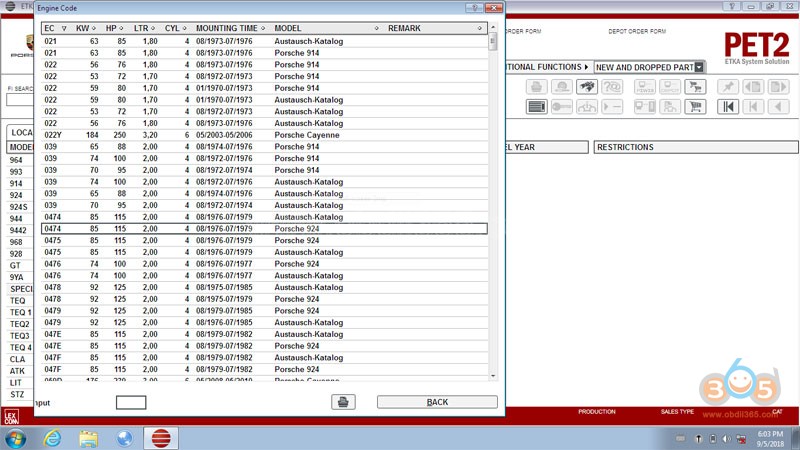
PET2 is the Porsche electronic parts catalo with multi languages.  Porsche PET2 covers the newest and fullest information of spare parts including entering VIN number of the machine and carrying out a filtration, defining on VIN model and modeling year and search of application spare parts.  Spare Parts Catalog for Porsche Cars PET2 8.0 software no need active.

What is PET2 V8.0:
Electronic spare parts catalogue Porsche contains the full information on spare parts.
The catalogue occupies one CD, it is possible to establish for work with use of CD, or completely on the winchester.

The spare parts catalog Porsche allows to enter VIN number of the machine and carries out a filtration, using it, but thus number of a body is not taken into account, that is the program Porsche will define on VIN model and modelling year (using first 11 symbols VIN), the rest should be chosen independently. It means, that the program Porsche easy digests VIN numbers with thought up last figures that can lead to to mistakes in identification of units.

In the program there is a function of search of application spare parts, she allows to search application of a detail, and also the information concerning to replacements and returnable parts, the information about “fractional” the deputy. At work with the given catalogue, it is necessary to pay special attention to various footnotes and notes, and also if necessary to look in lists of fractional replacements and V, S and P-page more often to not receive a detail which you did not wait. The price-list is delivered separately either on CD, or on several diskettes.
porsche-pet-v8-1

porsche-pet-v8-2

porsche-pet-v8-3

porsche-pet-v8-4

porsche-pet-v8-5

porsche-pet-v8-6

porsche-pet-v8-7

porsche-pet-v8-8

porsche-pet-v8-9

porsche-pet-v8-10

porsche-pet-v8-11
VERY VERY VERY IMPORTANT:
You have to get PET 2 v8.0 on your own. Use Google and search it. It’s YOUR OWN RISK!!!
For catalogue without password/activation and with no expiration, PET 7.3 is your way to go: